Spin.City · Mobile · verified 31 Jul 2026
Spin.City offers no downloadable mobile app for iOS or Android
Players searching for a Spin.City mobile app on the Apple App Store or Google Play Store will find no official native listings. Although the website footer displays App Store and Google Play badges, neither leads to a store page. Mobile gameplay operates via an installable web app configured through the site's manifest.
- iOS or Android app spin.city/en-ca
- None
- What you actually get spin.city/en-ca
- Installable web app
App store availability audit
Footer store badges and missing native app listings
A primary source of confusion for mobile users visiting Spin.City is the prominent display of Download on the App Store and GET IT ON Google Play badges in the footer and main navigation rail. Clicking these graphics does not direct players to official marketplace listings on Apple's App Store or Google's Play Store.
Audits of both Canadian and global application stores reveal zero official software entries published by Spin.City or its underlying corporate entity, Limitex Ltd. The store icons serve solely as triggers for an in-app registration prompt or Progressive Web App (PWA) installation drawer within the web browser.
Rather than distributing a native binary, Spin.City relies entirely on mobile web infrastructure. Players accessing the site from iOS or Android devices interact with a responsive single-page application built to adjust dynamically to mobile screen dimensions. spin.city/en-ca
-
Apple App Store
Badge, no listing ABSENT
Checked against spin.city/en-ca
-
Google Play
Badge, no listing ABSENT
Checked against spin.city/en-ca
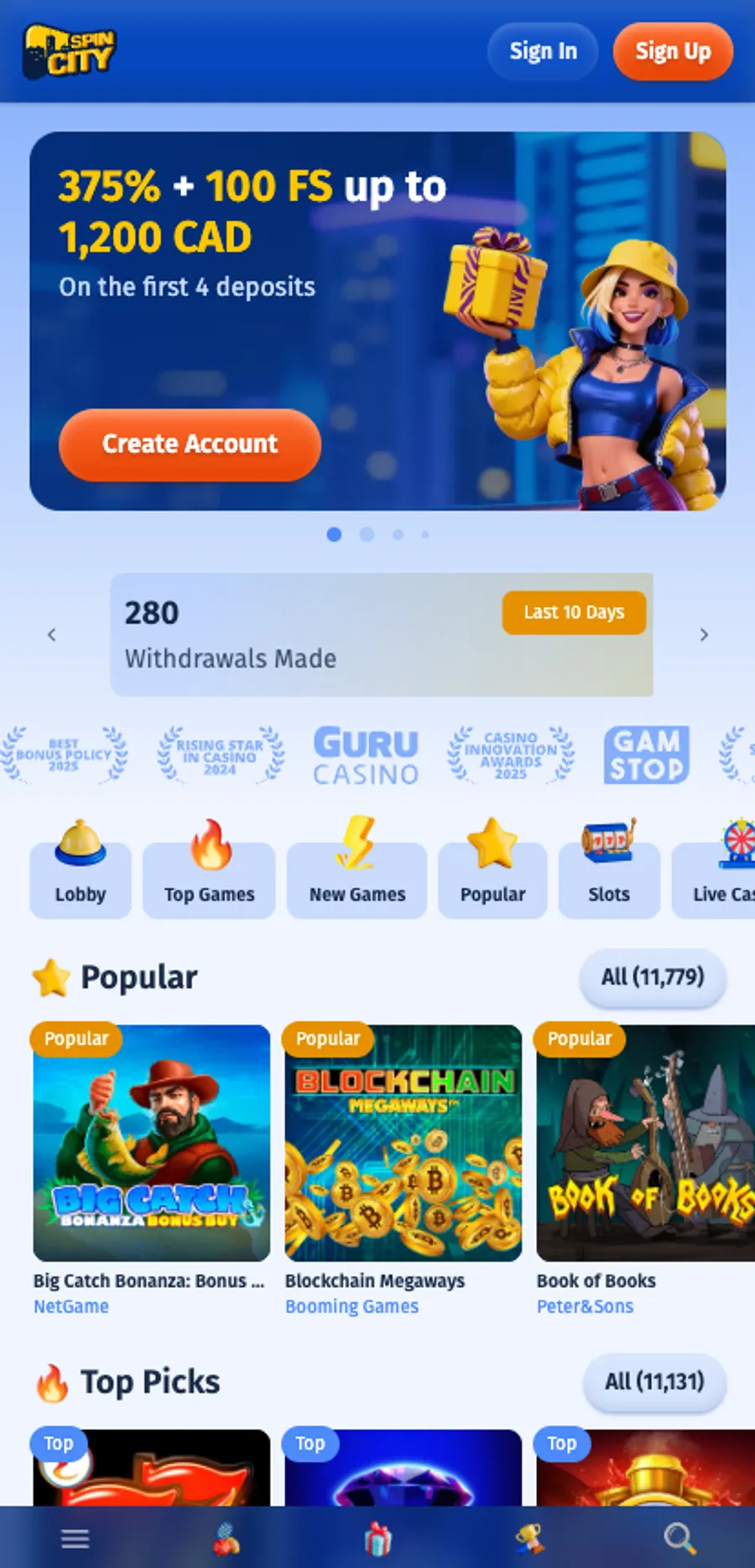 Screenshot
 Progressive Web App installation
Standalone Web App Manifest and home screen shortcuts
The actual mobile installation mechanism provided by Spin.City is a Progressive Web App (PWA). The site serves a Web App Manifest at /manifest.json configured with standalone display mode, custom brand theme colors, and launcher icons in standard 192x192 and 512x512 PNG resolutions.
When saved via Safari on iOS or Chrome on Android using the Add to Home Screen command, the web app creates a dedicated launcher icon. Operating in standalone mode removes the standard browser address bar and navigation frame, providing an app-like full-screen interface.
The web app delivers complete feature parity with the desktop website. All 11,779 games across 130 studios, 452 live casino streams, cashier modals, and support channels remain accessible. Furthermore, promotional offers match desktop parameters exactly, as no mobile-exclusive or app-only bonuses exist. spin.city/en-ca
- PWA manifest at /manifest.json configures standalone full-screen display mode
- Home screen shortcut setup available via browser Add to Home Screen option
- 100% catalog parity with all 11,779 titles and 452 live tables accessible
- No app-exclusive bonuses; all desktop promotions apply on mobile web
Play at Spin.City
Access Spin.City on Mobile
Use any modern mobile web browser to launch the web app without downloading third-party software.
New players, four deposits, each leg capped at 300 CAD. 40× wagering on the bonus, most it can release is 200% of itself, and your own deposit needs 2× turnover or a 10% withdrawal fee applies. Registration from Canada was refused when we tested it. 19+.
Security and authentication
Mobile login, biometrics, and security considerations
Authentication on the mobile web app is handled through conventional email address and password inputs. Spin.City does not support native WebAuthn or FIDO2 passkey standards for biometric login. Fingerprint or Face ID authentication functions exclusively through the mobile operating system's built-in password manager autofill.
Because no native application or official APK download is hosted on spin.city, players should exercise caution regarding external websites. Installing unverified installation packages from third-party blogs or file mirrors presents security hazards including malware or credential theft.
Overall, while Spin.City provides a responsive mobile interface with complete catalogue access, its marketing overstates its application footprint by featuring store badges for non-existent app listings. spin.city/en-ca
What it delivers
- Full access to 11,779 games and 452 live dealer streams on mobile web
- Clean standalone PWA interface removes browser chrome on home screen launch
- Works on standard mobile browsers without requiring store downloads
What it takes back
- Footer App Store and Google Play badges are misleading and lead to no listing
- No native WebAuthn or Face ID biometric login integration
- Requires modern browser rendering; low-spec devices may experience restarts
Straight answers
Is there an official Spin.City mobile app on the App Store or Google Play?
No. Spin.City publishes no native applications on the Apple App Store or Google Play Store. The footer badges trigger web prompts rather than leading to native store listings.
How do you install the Spin.City mobile shortcut on a phone?
Open spin.city in a mobile web browser (Safari on iOS or Chrome on Android) and select Add to Home Screen. This installs a standalone Progressive Web App (PWA) shortcut.
Are there mobile-exclusive bonuses for playing on a phone?
No. Promotional offers on mobile web match desktop terms exactly, including the four-deposit welcome package.
Sources
Every figure on this page, and where it was read
Operator pages — read and screenshotted 31 July 2026
- spin.city/en-ca Spin.City Canadian English homepage spin.city/en-ca
- About About page — five headings of marketing copy and no company details spin.city/en-ca/about
- T&C Spin.City terms and conditions, last updated 15.04.2026 — 66,000 characters, served in English on both Canadian locales spin.city/en-ca/terms
Printed, not linked. The clauses these pages carry are reproduced on this page as screenshots, so there is nothing to go and verify on a marketing site.
Independent sources — checkable
375% up to 1,200 CAD + 100 spins
See the welcome pack19+ · Gambling involves risk; only stake what you can afford to lose.